The AI Job Search Toolkit
A free, multi-path resource that helps job seekers who already use AI do it systematically and get results that actually sound like them.
AI Workflow Design
The problem — Repetitive tasks and generic output
Research shows tailored applications can double your chances of landing an interview. So I committed to customizing my CV and cover letter for every role.
In reality, it was slow, even with AI. Each new chat meant starting from scratch, re-explaining my background, target roles, and tone. The output was fine, but generic and still needed heavy editing.
The friction made me inconsistent. Some applications were tailored, others weren't.
I needed a workflow that cut the time to apply and made tailoring the default.
The design decisions — Adoption first. Technical elegance second.
The key insight is behavioral. The best workflow is the one that drives consistent, thorough applications,
01 — Context first
I started with a prompt library, but quickly saw prompts are only as good as their context. So the real foundation became three reference docs: a job search strategy, a master CV, and a cover letter for tone. They encode who you are once and improve every output. Building the strategy doc had an added benefit — it forced me to clarify my direction. That insight became part of the toolkit.
02 — Three delivery paths
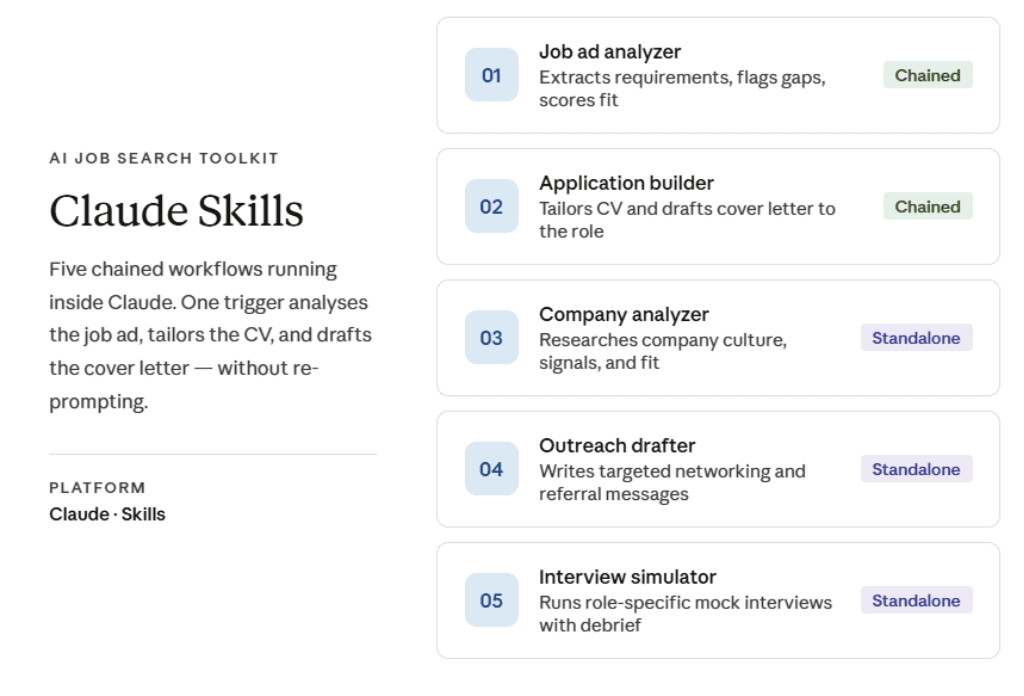
My own workflow runs on Claude Skills. But requiring a specific tool would have excluded most of the people I built this for. So I made the same five workflows available three ways: a prompt library (any AI, no setup), Claude Skills (automated, chained), and Custom GPTs (no-setup, simply add to ChatGPT). The workflow matters more than the tool. The same five steps work whether you're using Claude, ChatGPT, or any other LLM.
03 — Claude Skills vs Custom GPTs
Access drove the decision to build the workflow on both Claude and ChatGPT, and it enabled a like-for-like performance comparison. Claude Skills are more efficient thanks to chaining: workflows 01–03 run from a single trigger, analyzing the job ad, tailoring the CV, and drafting the cover letter without re-prompting. Custom GPTs aren't linked, so they can't replicate this flow.
04 — A diagnostic, not just tools
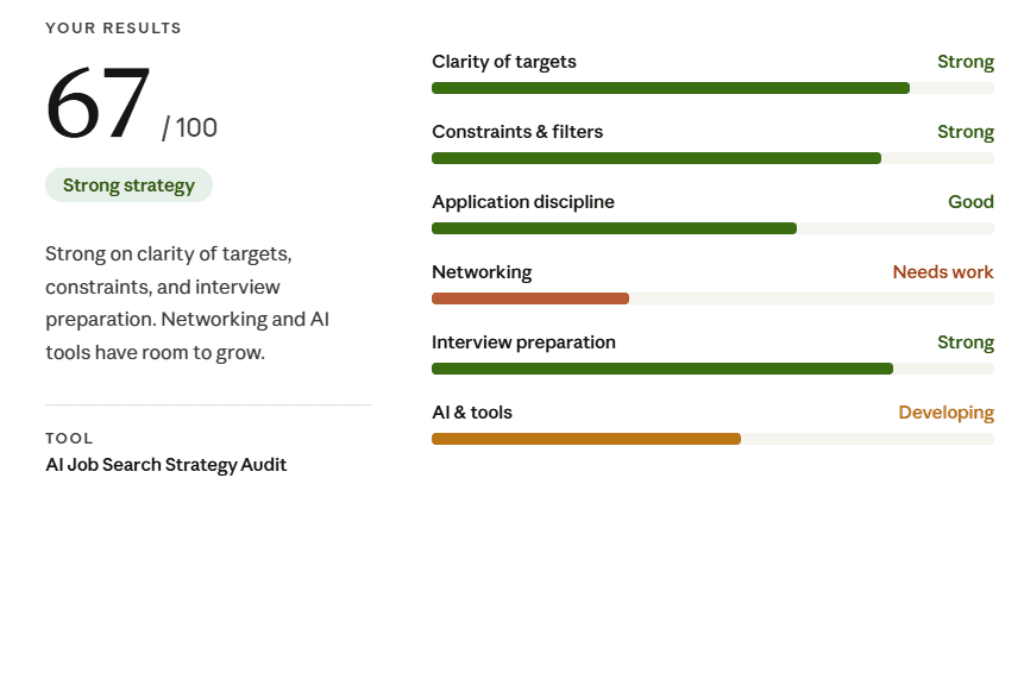
The Job Search Strategy Audit shows that AI amplifies a job search — it doesn't replace it. Strong, tailored applications are essential, but they're just one lever alongside networking, direct outreach, and the hidden job market. By reducing the time spent on applications, the toolkit frees up capacity for these higher-value activities.
What I built — Five tools. Every stage of a search.
Tool 01: Job Ad Analyzer
Tool 02: Company Analyzer
Tool 03: Application Builder
Tool 04: Outreach Drafter
Tool 05: Interview Simulator
Diagnostic: Strategy Audit
I used the project to experiment with vibecoding. With Claude, I wrote the copy and iterated on the wireframes for the website using Artifacts. The whole process took a few weeks: building and testing the Skills, getting up to speed on Custom GPTs, writing the documentation, and deploying on Vercel.
Results — Less time per application. More applications done right.
90→25: Minutes per tailored application, before and after
198: People reached the hub within days of launch
100%: Of applications now tailored, vs. inconsistently before
The biggest impact is behavior change. Before this workflow, I tailored applications inconsistently, giving more attention to early roles and cutting corners later. Now I tailor every time. The system makes the right behavior the default.
Early signals are encouraging: 198 visitors soon after launch, two workshop sign-ups, and direct feedback calling it genuinely useful. A live workshop is the next step under consideration.
The bigger insight
"AI doesn't just save time. Used well, it forces clarity and structure, bringing you closer to the truth of your work."
What I'd do differently
The focus was on building an efficient workflow and proving it can run across tools. In hindsight, I should have planned for adoption tracking from the start. I can see traffic metrics but lack visibility into path choice, drop-off, and whether the foundation documents felt like friction or support. Vercel doesn't support that level of tracking as standard, and it's difficult to add later. Adoption metrics need to be part of the setup from the beginning.